Zapier vs Make: The Ultimate 2026 Automation Showdown
Our Review Methodology (Why Trust Us?)
To bring you this comprehensive 2500-word technical guide, our integration engineers spent over 60 hours testing both Zapier and Make (formerly Integromat). We constructed complex, multi-step data pipelines connecting CRM systems (Salesforce, HubSpot) to databases (Airtable, SQL). We aggressively stress-tested API rate limits, compared the processing of complex nested JSON payloads, evaluated built-in error handlers (Ignore vs. Break directives), and audited the true 2026 pricing models for high-volume execution. We do not just recite marketing fluff; we build real enterprise workflows to find the breaking points of these tools.
The modern business landscape is defined by its tech stack. On average, a mid-sized company uses over 100 different software applications. The lifeblood of operational efficiency is ensuring these disparate applications talk to each other seamlessly. Enter iPaaS (Integration Platform as a Service). Choosing the right automation backbone is a million-dollar decision. Pick the wrong tool, and you will face exponential costs, broken API connections, and a logistical nightmare.
In the orange corner, we have Zapier, the undisputed pioneer of low-code automation. With a massive war chest and the largest app directory on earth, it is the darling of marketers and founders. In the purple corner stands Make (formerly Integromat), the visual disruptor. Renowned for its infinite canvas, aggressive pricing, and deep technical flexibility, it is the tool of choice for hardcore operations teams and developers.
The Quick Verdict
If you are a non-technical user, marketer, or founder who needs to connect popular apps in simple, linear A-to-B workflows within minutes without looking at code, choose Zapier. However, if you have a basic understanding of logic, need to build complex branching workflows with error handling, and want to process massive amounts of data at a fraction of the cost, choose Make.
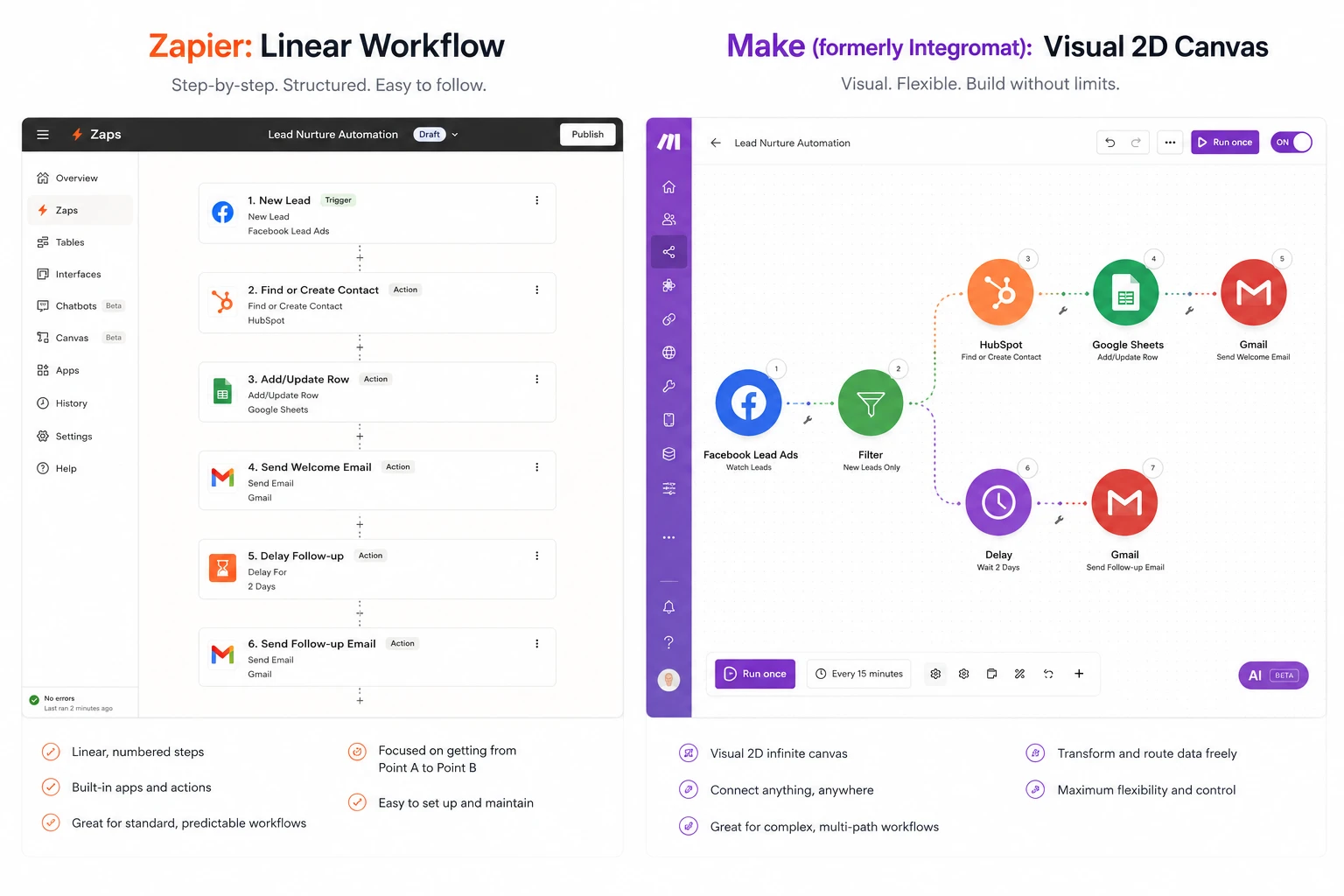
At a Glance: The Automation Heavyweights
Before diving into the complex mechanics of Webhooks, JSON parsing, and conditional logic routers, here is a high-level overview of how these two industry leaders compare across critical metrics.
| Metric / Feature | Zapier | Make (formerly Integromat) |
|---|---|---|
| Target Audience | Marketers, Founders, Non-technical teams. | Ops Managers, Developers, Data engineers. |
| Actual Starting Price (Paid) | $19.99 / mo (Billed Annually) | $9.00 / mo (Billed Annually) |
| Actual User Rating (G2) | ||
| App Integrations | 6,000+ (Industry largest) | 1,500+ (Growing rapidly) |
| Workflow Logic | Linear (Top-down) with limited Paths | Visual Canvas (Infinite routing/branching) |
| Action | Visit Zapier | Visit Make |
Core Architectural Philosophies
You cannot effectively choose between these platforms based purely on pricing or integration counts. You must understand the fundamental architecture and philosophy behind how each platform processes data payloads.
"Automation that moves you forward. Connect your apps and automate workflows."
Zapier is designed entirely around simplicity and speed of deployment. Its architecture is strictly linear. You define a Trigger (When X happens), and it follows a straight line down to Actions (Do Y, then Z). The UI obscures complex API documentation, headers, and authentication tokens from the user. It is the ultimate "black box" of automation—you tell it what you want, and it handles the complex technical routing invisibly in the background.
- Easiest learning curve in the iPaaS industry
- Unmatched ecosystem of 6,000+ native apps
- Built-in formatting and filtering tools
"Design, build, and automate anything visually. Fast and without code."
Make (Integromat) rejects the linear top-down approach. Instead, it offers an infinite 2D canvas where your automation (called a "Scenario") looks like a mind map. It exposes the underlying mechanics of API calls. You can clearly see how JSON arrays are mapped, iterate over arrays, aggregate data, and build infinite conditional routes (if/then paths). It expects the user to have a rudimentary understanding of data structures, rewarding them with unparalleled power.
- Infinite visual branching and routing (Routers)
- Advanced Array iterators and aggregators
- Radically lower cost for high-volume execution
1. Ease of Use, UI & The Initial Setup Experience
If a tool takes 40 hours to learn, the ROI of automation is instantly diminished. Let's examine the learning curves.
Zapier's Approach
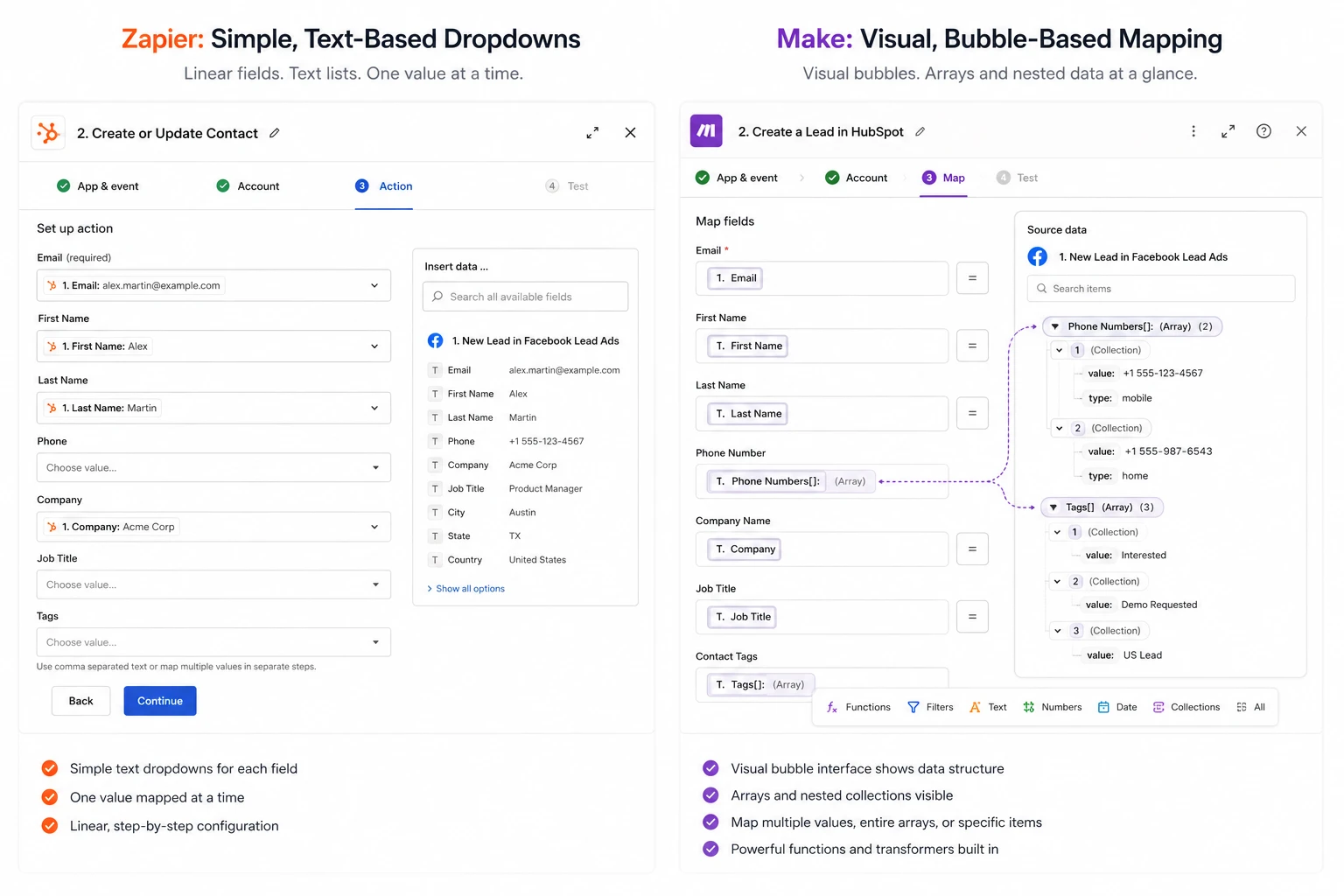
Zapier is a masterclass in UX design for non-developers. Creating a "Zap" is a top-to-bottom scrollable experience. The interface asks plain-English questions: "Which app?", "Which event?", "Which account?". When you map data from a trigger (like a form submission) to an action (like a Google Sheets row), Zapier visually highlights the sample data clearly.
The recent addition of Zapier AI allows you to simply type: "When I get an email with an invoice, save the attachment to Google Drive and send a Slack message." Zapier will instantly construct the exact framework for you. You can literally launch a functioning automation in 60 seconds.
Make's Approach
Make drops you onto a blank canvas with a single pulsating circle. You click it to add an app. From there, you drag connections to other circular modules. While visually stunning, mapping data in Make can be intimidating for a beginner. You are immediately confronted with technical terms like "Collections," "Arrays," "Iterators," and string manipulation functions.
Make does not hide the complexity of APIs. If a payload returns an array of items, Make forces you to use an "Iterator" module to process them one by one. This steep learning curve is the primary reason many users abandon Make on day one.
Zapier radically democratizes automation. A marketing intern with zero coding knowledge can build a multi-step Zapier workflow on their first day. Make requires dedicated study to master.
2. Core Logic: Branching, Iteration, and Data Manipulation
Real-world business processes are rarely linear. They involve conditional logic (IF X, do Y; IF A, do B) and handling multiple line items.
Zapier's Approach
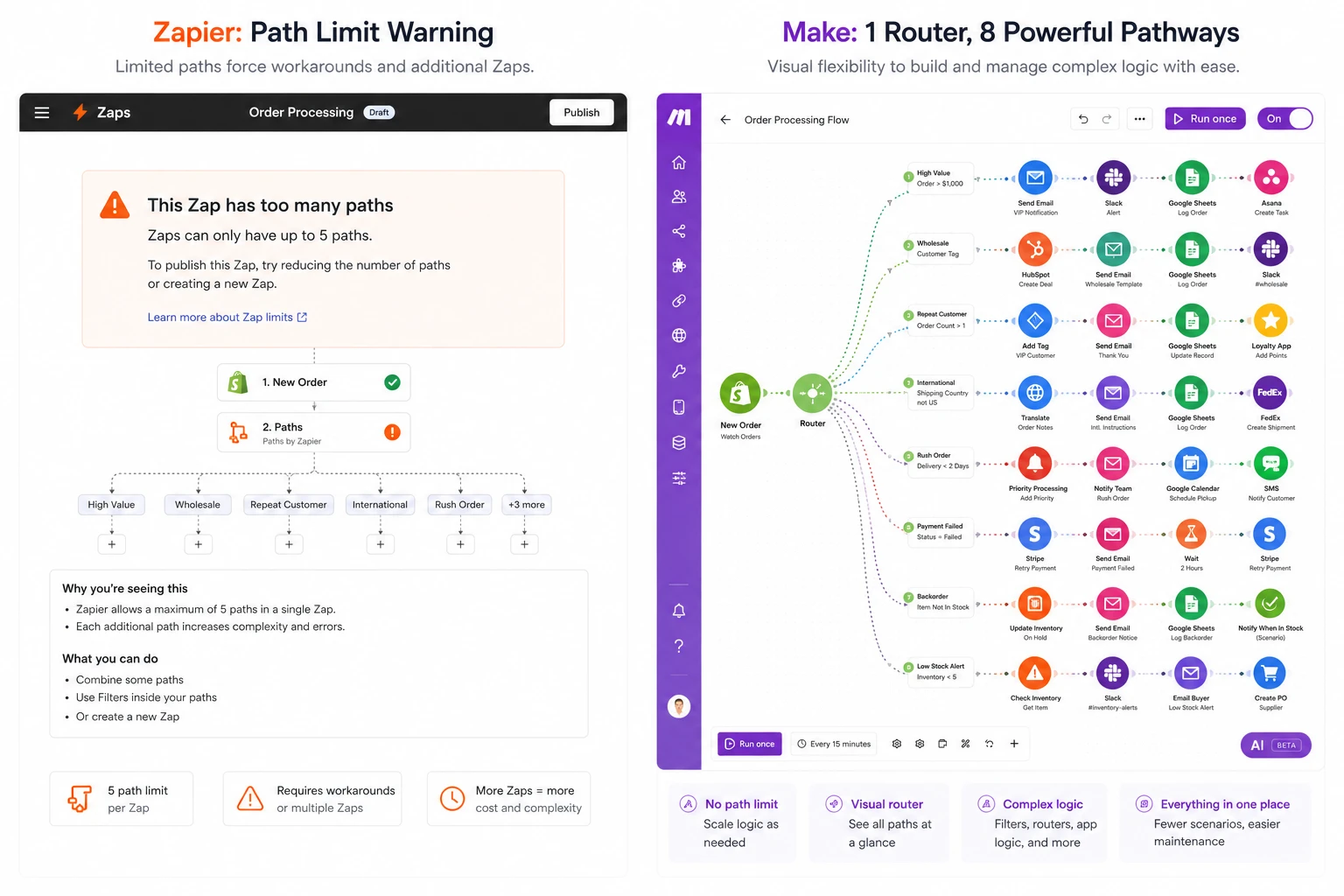
Zapier introduced "Paths" to handle conditional logic. However, Paths are restricted to higher-tier paid plans. Furthermore, a single Zap can only have a maximum of 5 paths per step, and paths cannot easily merge back together into a single stream. It becomes incredibly cumbersome if you have 10 different geographic routing rules for a sales lead.
For data manipulation, Zapier uses its built-in "Formatter" tool. You add a step to format text, perform math, or parse dates. While easy to use, each Formatter step costs you a "Task," quickly burning through your monthly quota.
Make's Approach
Make destroys Zapier in this category. Make utilizes "Routers," which you can use for free on any plan. A router splits your workflow into infinite conditional branches. You can even route a path, execute logic, and seamlessly merge it back into the main flow. It is visually intuitive to see where data travels.
Instead of requiring a separate step (and charging you for it) to format text, Make includes Excel-style functions directly inside the mapping fields. You can use upper(text), formatDate(now; 'YYYY-MM-DD'), or complex RegEx matching directly inside the payload field of an API call without wasting an operation.
Make's Routers, Iterators, and inline function mapping provide developer-level logic control that Zapier simply cannot match without hitting hard structural limits.
3. True Pricing, Tasks vs Operations & Value for Money
Understanding how these platforms count usage is the most critical financial decision your operations team will make. The discrepancy is staggering.
Zapier's Approach
Zapier charges based on Tasks. A Task is consumed every time an action step successfully runs. (Triggers do not consume tasks). If you have a workflow with 1 Trigger, 1 Formatter step, 1 Filter, and 2 Actions, every single time it runs, it consumes 4 Tasks.
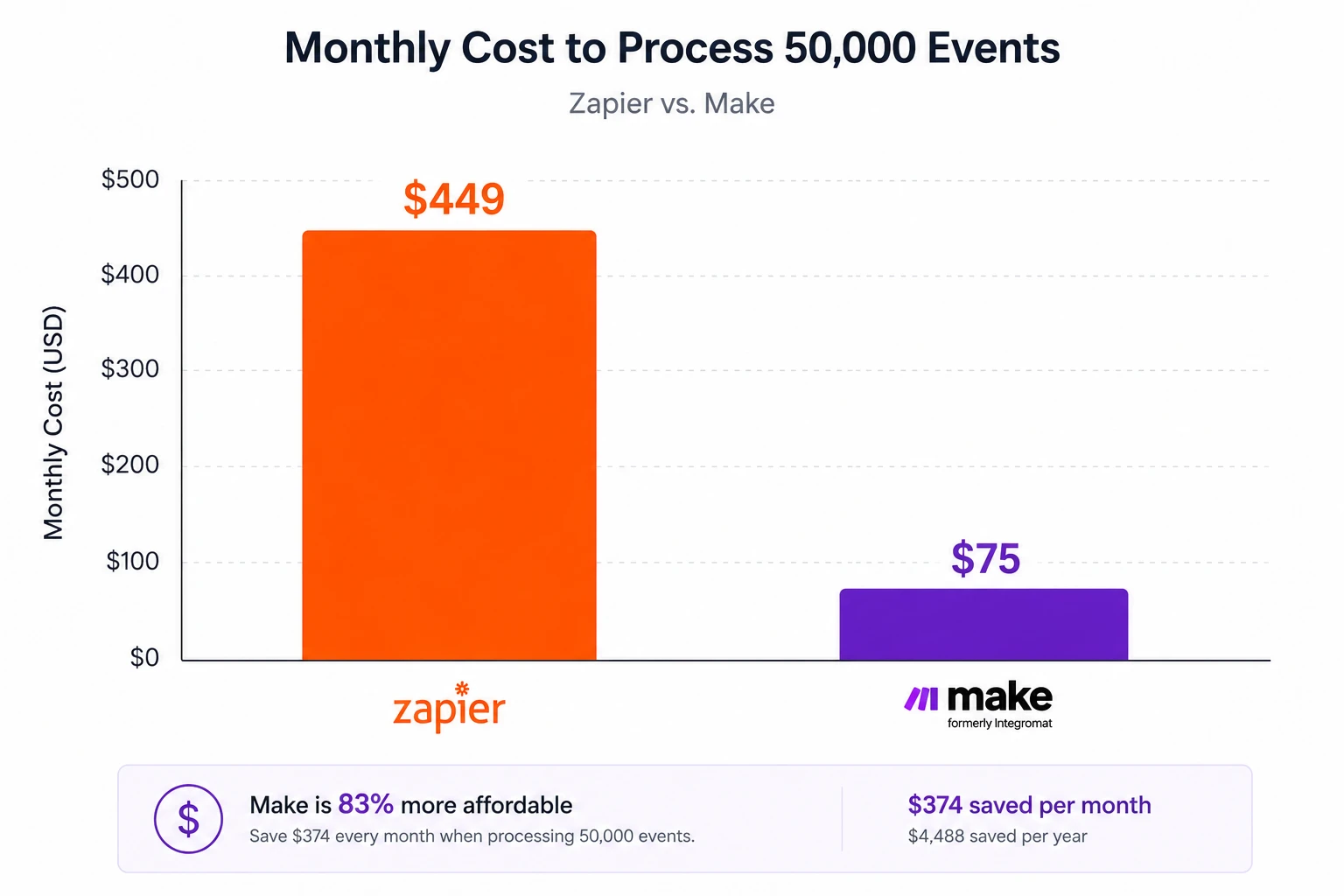
Zapier's pricing scales aggressively. The "Professional" plan starts at $49/month for only 2,000 tasks. If you process 50,000 tasks a month (which is very easy for a mid-sized e-commerce brand doing order routing), Zapier will cost you $449/month. You are heavily penalized for building multi-step, complex automations.
Make's Approach
Make charges based on Operations. Every single time a module executes (including triggers, routers, and actions), it consumes 1 Operation. At first glance, this sounds worse. However, because Make allows inline data formatting, you don't need dedicated formatting steps.
The true advantage is the raw price-per-operation. Make's "Core" plan offers 10,000 operations for just $9/month. If you need 50,000 operations a month (equivalent to our Zapier example), Make's "Pro" plan costs a mere $75/month compared to Zapier's $449. The financial savings at scale are astronomical.
It is not even a contest. For high-volume data processing, Zapier's pricing model is prohibitively expensive. Make offers easily 5x to 10x more execution volume for the same price.
4. Integrations & The Ecosystem Depth
An automation tool is entirely useless if it cannot connect to the specific software stack your business relies on.
Zapier's Approach
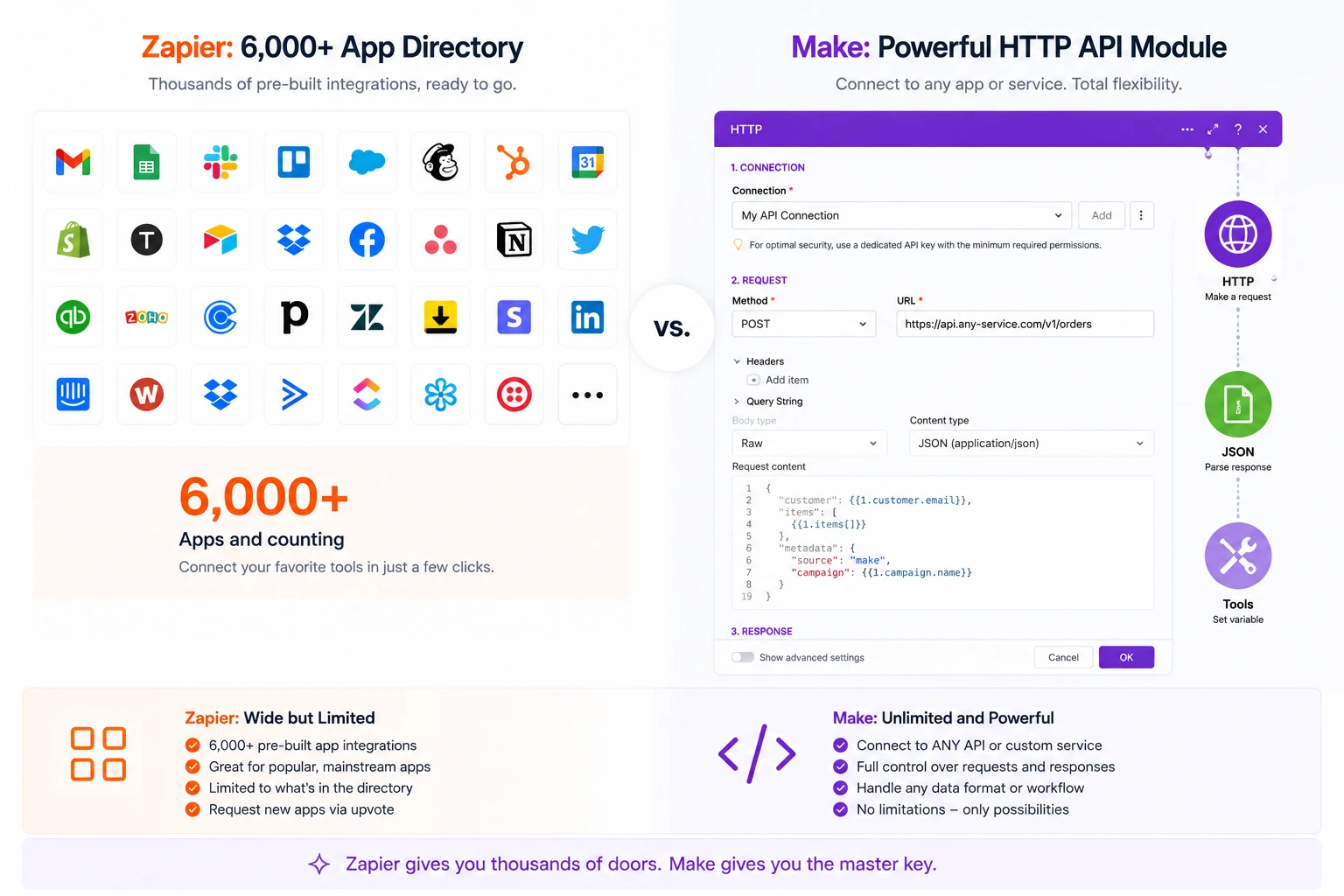
Zapier is the undisputed king of integrations, boasting over 6,000+ native apps. Because of Zapier's massive market share, whenever a new SaaS startup launches, they build a Zapier integration on day one. If you use obscure, niche, or brand new marketing software, Zapier will have a native module for it.
Furthermore, Zapier's integrations are often deeper. App developers maintain their own Zapier integrations, ensuring that specific triggers (like "New tag added to contact") are supported natively without requiring Webhooks.
Make's Approach
Make has a rapidly growing directory of over 1,500+ apps. While they cover all the major players (Google Workspace, Slack, Salesforce, HubSpot), you will frequently find that smaller or newer tools lack a native Make module.
However, Make provides a legendary workaround: its built-in HTTP and Webhook modules. Make's HTTP module is practically a full-fledged API client (like Postman). You can construct any REST API call (GET, POST, PUT), manipulate headers, handle OAuth2.0 authentications, and parse the returning JSON directly on the canvas. If an app has an open API, you can connect it to Make, even without a native integration.
While Make's HTTP module is incredibly powerful for developers, Zapier wins the integration war through sheer volume. 6,000+ native apps means you rarely have to read API documentation.
5. Error Handling, Debugging & Execution History
APIs fail. Servers go down. Passwords change. How an automation platform handles a catastrophic failure determines how many hours you will spend doing manual data entry to fix it.
Zapier's Approach
When a Zap fails (e.g., an API times out), Zapier stops the execution. On premium plans, Zapier has an "Auto-replay" feature that will automatically attempt to run the task again a few minutes later. If it fails repeatedly, it sends you an email.
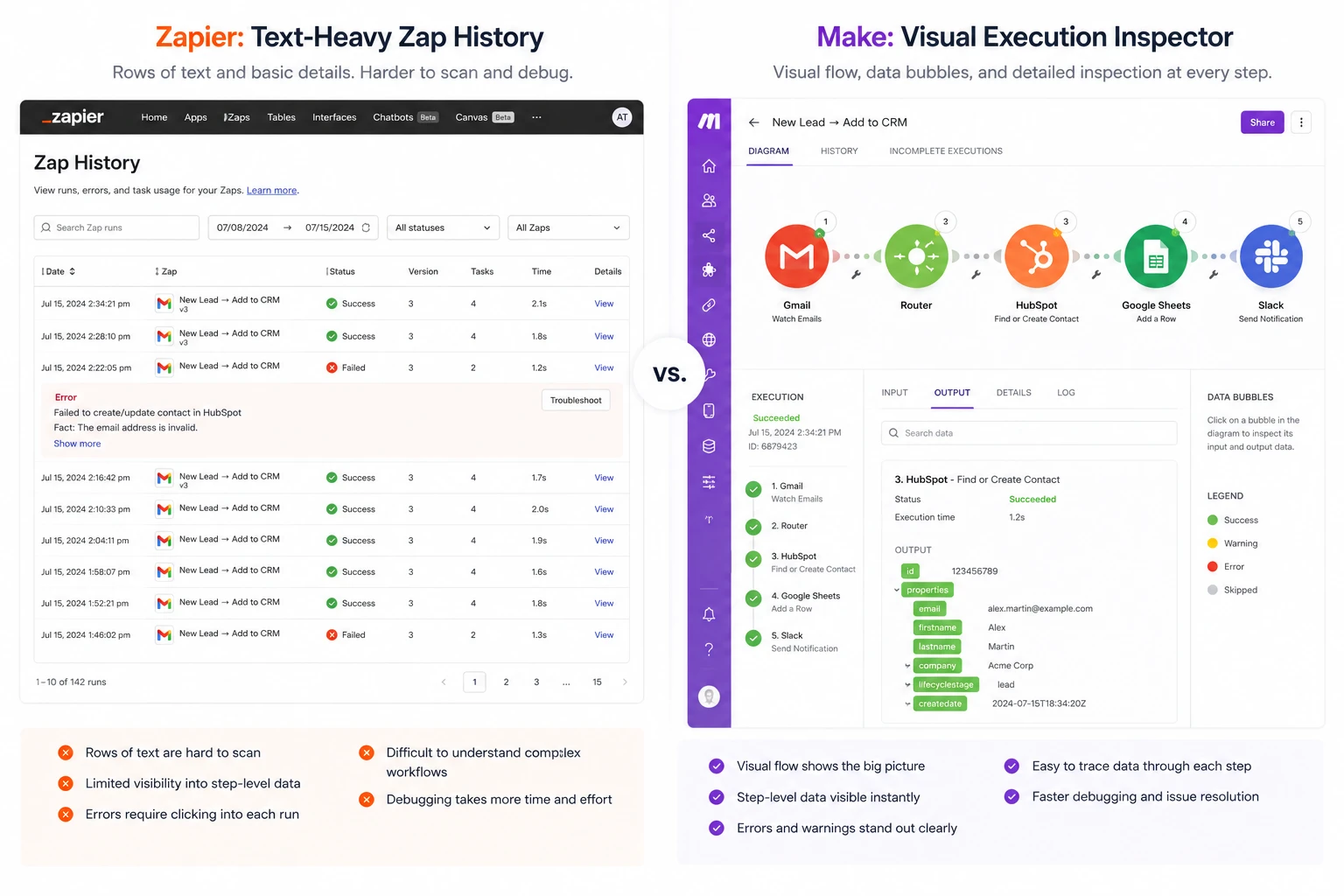
Debugging in Zapier involves looking at the "Zap History" log. It is a linear text log showing input and output data. While functional, it is notoriously tedious to figure out exactly *why* a specific JSON payload caused a failure deep inside a 15-step Zap.
Make's Approach
Make offers advanced, developer-grade error handling. You can attach specific "Error Handler" modules to any step in your scenario. If a step fails, you can dictate exactly what happens: you can use an Ignore directive to skip it, a Break directive to store the data in an incomplete execution queue for manual review, or a Resume directive to supply fallback data (e.g., if a lookup fails, supply a default ID) and keep the automation running.
Make's execution history allows you to replay a failed scenario visually directly on the canvas. You can inspect the exact data bubble at the exact node where it failed.
Make treats error handling like a true programming environment. The ability to build custom fallback routes for failed API calls ensures mission-critical data is never permanently lost.
6. Security, Compliance & Enterprise Readiness
When connecting CRMs, billing systems, and employee databases, the iPaaS platform has access to your company's most sensitive PII (Personally Identifiable Information).
Zapier's Approach
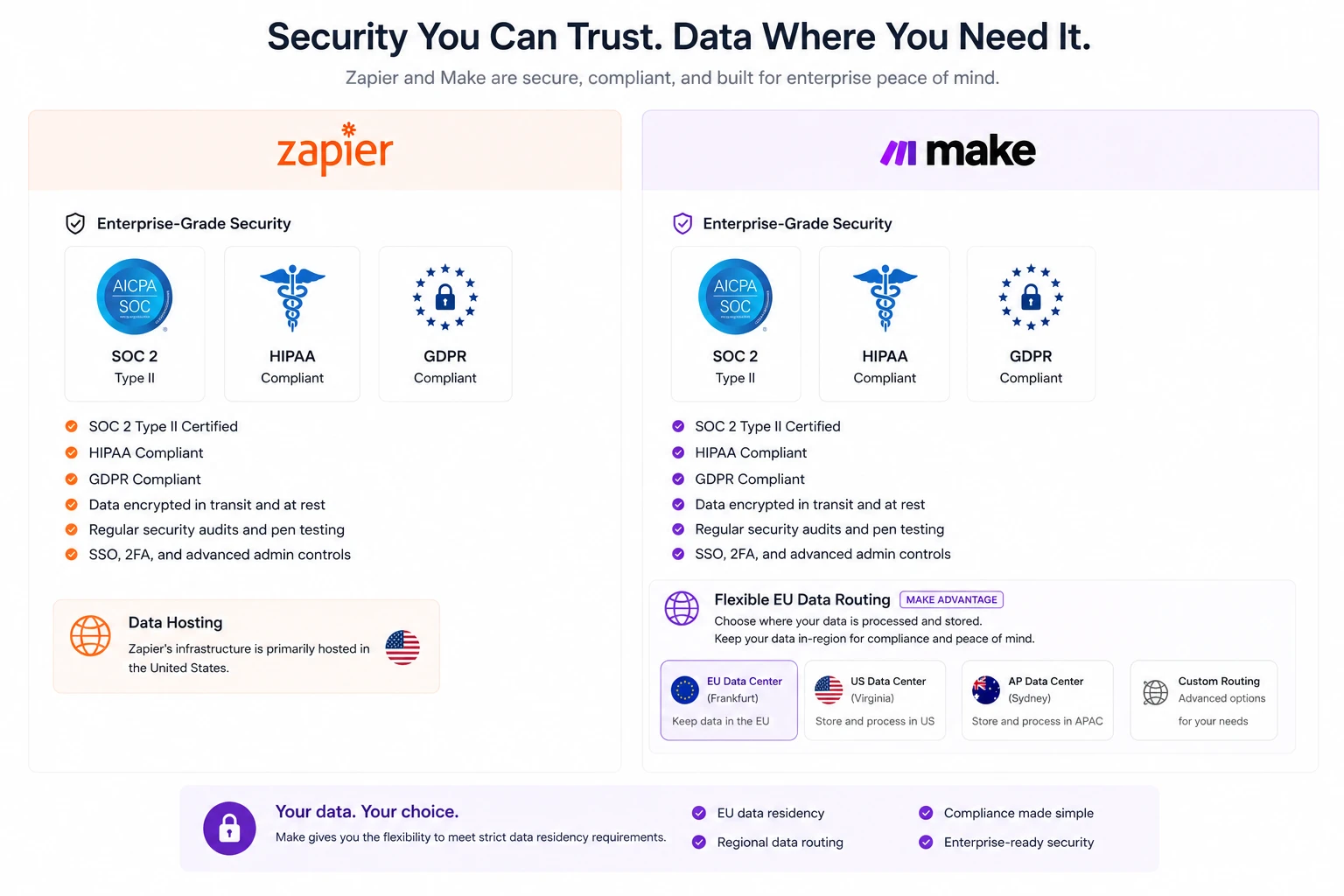
Zapier is highly secure and holds SOC 2 Type II compliance. For enterprise customers, Zapier offers advanced features like Custom Data Retention (deciding how long Zapier holds your task history data), SAML Single Sign-On (SSO), and granular workspace permissions.
They are fully GDPR compliant and offer HIPAA compliance for healthcare companies on their top-tier Enterprise plans. Their infrastructure is robust, audited regularly, and trusted by Fortune 500 companies.
Make's Approach
Make (which is headquartered in the EU and owned by Celonis) has built security directly into its core to satisfy strict European regulations. Like Zapier, they maintain SOC 2 Type II and ISO 27001 certifications. They are fully GDPR compliant.
Make Enterprise goes a step further by offering dedicated, single-tenant hosting environments. This means your data processing does not share server space with other customers. Furthermore, Make allows you to specify whether you want your data hosted in their US or EU data centers, a critical requirement for European enterprise clients.
Both platforms adhere to the highest global security standards. Zapier is slightly more favored by US enterprises for HIPAA, while Make's EU data center options make it heavily preferred in Europe.
Technical Feature Matrix (Deep Dive)
A closer look at the advanced capabilities that define the ceiling of what you can build on these platforms.
| Technical Feature | Zapier | Make (Integromat) |
|---|---|---|
| Array Processing (Loops) | Requires separate "Looping" app (Max 500 items) | Native Iterators/Aggregators (Infinite) |
| Conditional Branching | Limited "Paths" (Requires paid plan, max 5) | Infinite "Routers" (Available on Free tier) |
| Inline Data Formatting | No (Requires consuming a Formatter Task step) | Yes (Hundreds of built-in Excel-style functions) |
| Webhook Responses | Basic (Custom HTTP responses are limited) | Advanced (Can return custom JSON, status codes) |
| Version Control / History | Yes (Zap Drafts & Versions) | No native rollback versioning |
| Custom App Development | Excellent Developer CLI & UI builder | Requires deeper API programming knowledge |
Actual 2026 Pricing Breakdown
Automation costs can spiral out of control if you choose the wrong pricing model for your data volume. Here is the actual real-world cost analysis.
Zapier Core Plans
Make (Integromat) Costs
The Decision Framework (Who Should Choose What)
Choose Zapier If:
- You are a non-technical marketer or founder who wants to build automations in minutes.
- Your company uses niche, obscure, or brand-new software that requires native app integrations.
- Your workflows are mostly linear (e.g., Lead comes in -> Add to CRM -> Send Email).
- Budget is not a primary concern, and you value time-saved over cost-saved.
Choose Make If:
- You have a basic understanding of APIs, JSON arrays, and logical data structures.
- You process massive amounts of data (thousands of rows) and need cost-effective scaling.
- Your workflows require complex branching (Routers) and looping (Iterators).
- You need absolute control over error handling (building fallback pathways for failed APIs).
Avoid Both If:
- You require on-premise, self-hosted automation (Look at open-source tools like n8n).
- You are building embedded native integrations directly inside your own SaaS product for your end-users (Look at Workato or Tray.io).
The Final Expert Verdict for 2026
In the battle of the automation giants, declaring an absolute winner is impossible because they serve two completely different paradigms. Zapier is the ultimate tool for accessibility and speed. It translates complex API calls into plain English, allowing literally anyone to automate their daily tasks without writing a single line of code. If you prioritize ease of use and massive native integrations, Zapier is worth the premium price tag.
However, from a purely technical and financial perspective, Make is the superior architectural platform. Its visual canvas, native array iterators, infinite conditional routers, and aggressive per-operation pricing make it the undisputed king for operational specialists. If you are willing to spend the weekend watching a few tutorials to overcome the learning curve, Make will save you thousands of dollars a year while delivering exponentially more computing power.
Top Alternatives to Consider in 2026
n8n
A fair-code, self-hosted alternative to Make. It offers a visual node-based editor but allows developers to write raw JavaScript inside the nodes. Incredible for privacy-focused teams.
Visit n8n →Pabbly Connect
Famous for its lifetime deal pricing and not charging operations for internal tasks (like formatting). It is the budget-friendly alternative for marketers who find Zapier too expensive.
Visit Pabbly →Workato
The enterprise juggernaut. It is designed for massive IT departments building complex corporate automations (HR onboarding, ERP syncing) with strict governance and security features.
Visit Workato →Frequently Asked Questions (Expanded Analysis)
Is Make cheaper than Zapier?
Yes, significantly. Zapier charges per "Task" (every time an action step runs successfully). Make charges per "Operation" (every time a module executes). While they sound similar, Make's base price is $9 for 10,000 operations, whereas Zapier charges roughly $129 for a similar volume of 5,000 tasks. Furthermore, Make allows you to perform data formatting (like capitalizing a word) inline for free, whereas Zapier forces you to use a "Formatter" step which consumes a paid task. At high volumes, Make is easily 5x to 10x cheaper.
Can I migrate my Zaps to Make?
Unfortunately, there is no magical "one-click export" button. Because the underlying architecture (linear vs. array-based canvas) is fundamentally different, you must manually rebuild your workflows. The best approach is to map out your Zapier logic on a whiteboard, identify the API payloads, and re-create the scenario from scratch in Make. While tedious, the long-term cost savings usually justify the migration effort for heavy users.
Does Make have all the apps that Zapier has?
No. Zapier has over 6,000 native app integrations, making it the largest directory in the world. Make currently supports around 1,500+. However, this gap is somewhat mitigated by Make's incredibly powerful native HTTP and JSON modules. If a software has a public REST API, you can connect it to Make manually without needing a pre-built native app module. This requires reading API documentation, but it removes integration limitations entirely.
Which platform handles complex arrays and loops better?
Make handles arrays infinitely better. If you receive an API payload containing a list of 50 line items (like products in a single WooCommerce order), Make uses an "Iterator" module to break that array down and process each item individually, and then an "Aggregator" module to bundle them back up before sending them to an invoicing software. Zapier struggles heavily with line items; it requires a separate "Looping by Zapier" tool which is restricted to 500 items and is notoriously clunky to configure.
What happens when an automation fails?
In Zapier, the execution stops, and (on paid plans) it will auto-retry the step a few times before sending you an error email. Make provides a "programming-level" approach. You can attach specific "Error Handlers" to any module. If an API call fails (e.g., a 404 error), you can instruct Make to ignore it, break the flow and store the data in a queue for manual repair, or substitute fallback data and resume the execution seamlessly. Make's error handling is vastly superior for enterprise reliability.